
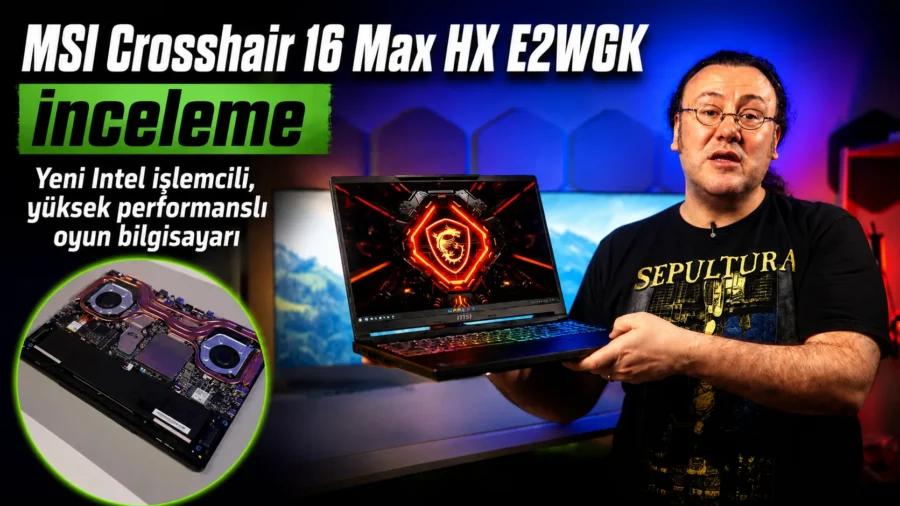
MSI Crosshair 16 Max HX E2WGK is a gaming laptop in the high performance class with its 16-inch body structure, Intel Core Ultra 290HX Plus processor, NVIDIA GeForce RTX 5070 Laptop GPU, QHD display options and up to 200W CPU-GPU combined power output. In addition to gaming performance, the device also offers a powerful mobile system for artificial intelligence-supported applications, rendering processes, broadcast scenarios, video editing and productivity software.
MSI Crosshair 16 Max HX E2WGK price and purchasing options MSI Crosshair 16 Max HX E2WGK technical specificationsMSI Crosshair 16 Max HX E2WGK comes with an Intel Core Ultra 200HX series processor infrastructure. The configuration we reviewed includes a 24-core Intel Core Ultra 290HX Plus processor. This processor has 8 performance cores and 16 efficiency cores. This structure is one of the strengths of the device in games that require processor power, rendering processes, broadcast scenarios and multitasking.
On the graphics card side, there is NVIDIA GeForce RTX 5070 Laptop GPU. The GPU comes with 8 GB GDDR7 graphics memory, maximum graphics power up to 115W, Dynamic Boost support and boost frequency up to 2347 MHz. The use of GDDR7 memory offers a more up-to-date memory infrastructure compared to previous generation GDDR6 and GDDR6X memory structures. CategoryDetailProcessorIntel Core Ultra 290HX Plus, 24 cores, 8 performance 16 efficiency coresGraphics cardNVIDIA GeForce RTX 5070 Laptop GPU, 8 GB GDDR7, 115W Dynamic Boost, boost up to 2347 MHz frequencyCombined powerUp to 200W power output for CPU and GPU with MSI OverBoostDisplay16 inch QHD 2560 x 1600; IPS-Level 240 Hz or OLED 165 Hz panel optionOLED panel 0 DCI-P3, SGS Eye Care Display, VESA DisplayHDR True Black 1000, 0.02 ms pixel response time Memory32 GB DDR5, dual slot, support for upgrade up to 128 GB, support up to 6400 MHz Storage1 TB NVMe SSD; 1 PCIe Gen4 M.2 and 1 PCIe Gen5 compatible M.2 slotKeyboard24-zone RGB gaming keyboard with Copilot keys, numeric keypad, 1.7 mm key travelCamera and soundHD 720p 30 FPS camera, 3D Noise Reduction, physical webcam shutter, 2 x 2W speakers, Nahimic AudioConnectionsThunderbolt 4, USB 3.2 Gen2 Type-C, 3 x USB 3.2 Gen2 Type-A, HDMI 2.1, SD card reader, RJ45, combo audio jackNetwork connectivityWi-Fi 6E, Bluetooth 5.3, 2.5GbE LANBattery and adapter80Wh battery, 240W adapterDimensions and weight363 x 269.7 x 21.9 5-23.85mm; OLED model 2.2 kg, IPS model 2.3 kg ColorCore BlackIntel Core Ultra 290HX Plus performanceMSI Crosshair 16 Max HX E2WGK has a 24-core Intel Core Ultra 290HX Plus on the processor side.
8 performance cores and 16 efficiency cores ensured high scores, especially in CPU rendering tests such as Blender. The processor also made a difference in performance in games that are not dependent only on the graphics card. In Blender tests, 233 points were obtained in the Monster scene on the CPU side, 178 points in the Junkshop scene and 129 points in the Classroom scene. The processor completed these tests with an average temperature of 76 degrees and a maximum temperature of 86 degrees.
In the CPU-Z stress test, the processor reached an average temperature of 80 degrees and a maximum temperature of 95 degrees. Maximum power consumption was measured at 138W. In the Marvel Rivals test, the processor temperature rose to 102 degrees with Frame Generation turned off. It should be noted that the tests were carried out during the summer period and the device was running in high performance mode. RTX 5070 Laptop GPU and DLSS performanceNVIDIA GeForce RTX 5070 Laptop GPU comes with 8 GB GDDR7 memory.
The graphics card offers maximum graphics power up to 115W and works with Dynamic Boost. GPU boost frequency goes up to 2347 MHz. The Blackwell infrastructure, DLSS 4.5, Max-Q technologies, CUDA, RT cores and Tensor cores that come with the RTX 50 series are also important for workloads other than gaming in this model. Ray tracing, artificial intelligence-supported rendering, frame generation and GPU-accelerated content production applications are among the areas of use of this graphics card.
In Blender GPU tests, the RTX 5070 Laptop GPU received 1722 points in the Monster scene, 1353 points in the Junkshop scene and 1139 points in the Classroom scene. In these tests, the GPU operated at an average temperature of 57.1 degrees and a maximum temperature of 65.6 degrees. In the FurMark stress test, the graphics card reached an average temperature of 69.9 degrees and a maximum temperature of 72.5 degrees. Maximum power consumption was measured as 107W.
200W MSI OverBoost power structureMSI Crosshair 16 Max HX E2WGK offers up to 200W combined power output for the CPU and GPU with MSI OverBoost technology. This value is valid in Apex Performance mode and when the adapter is connected. This power structure allows the device to distribute power between the processor and graphics card according to the load condition. In some games, the processor side is under more load, and in some games, the graphics card side is under more load.
Especially in tests performed at 2560 x 1600 resolution, this power sharing was seen with temperature and performance results varying depending on the games. QHD OLED and IPS-Level screen options There are two different 16 inch QHD screen options in the Crosshair 16 Max HX family. The first option is an IPS-Level panel with a resolution of 2560 x 1600 and a refresh rate of 240 Hz. The second option is an OLED panel with the same resolution and a 165 Hz refresh rate.
The device we reviewed came with an OLED panel. This panel offers 0 DCI-P3 color coverage, SGS Eye Care Display and VESA DisplayHDR True Black 1000 support. The ability to turn off pixels one by one on the OLED panel strengthens the black level. The 0.02 ms pixel response time also reduces the ghosting effect in moving scenes. The IPS-Level 240 Hz panel is offered for users who want a higher refresh rate, especially in competitive games.
The OLED panel, on the other hand, brings a different image profile in terms of contrast, black level and color coverage. In this model, panel selection is one of the topics that directly affects the purchasing decision. Cooler Boost cooling systemMSI uses the Cooler Boost cooling system in the Crosshair 16 Max HX model. This system includes 2 fans and 5 copper heat pipes. The device also has a phase change thermal component.
The phase change thermal component has a structure that fills the microscopic gaps between the processor and the cooler with heat. Here, MSI has chosen a thermal solution that does not pose a risk of leakage instead of liquid metal. A more stable structure has been used against problems such as thermal paste leakage, performance decrease and temperature increase, which may occur in laptops in the long term. GPU temperatures remained controlled in the tests.
On the processor side, higher temperature values were seen, especially in competitive games that loaded the processor and challenging scenarios such as Marvel Rivals. Despite this, the device completed the tests and there was no significant break in performance. Memory, SSD and upgrade optionsMSI Crosshair 16 Max HX E2WGK comes with 32 GB DDR5 memory. The memory speed on the device we examined appeared to be 5600 MHz.
The device has two memory slots and the memory capacity can be increased up to 128 GB. On the DDR5 side, support up to 6400 MHz is stated. On the storage side, there is a 1 TB NVMe SSD. Micron 2500 series 1 TB SSD was used in the device we reviewed. On the Windows side, the available space appeared to be 954 GB. In the SSD test, 6870 MB/s reading and 5986 MB/s writing speeds were achieved. SSD temperature was measured as an average of 46 degrees and a maximum of 65 degrees.
The device has one NVMe PCIe Gen4 M.2 SSD slot and one NVMe PCIe Gen5 compatible M.2 SSD slot. Internal storage upgrades can be made for large game libraries, video editing projects, engineering files and architectural studies. SSD test ResultSSD modelMicron 2500 1 TBUsable space954 GBReading speed6870 MB/sWriting speed5986 MB/sTemperatureAverage 46 degrees, maximum 65 degreesKeyboard, touchpad and case design24-zone RGB gaming keyboard with Copilot key on the device is available.
WASD keys and arrow keys are separated by an illuminated design. The numeric keypad is also included in the body. 1.7 mm key travel distance provides a clearer key feeling during gaming. There are some differences in the keyboard layout. The location of keys such as Num Lock, Enter and Del differs from standard keyboards. The enter key comes in a split layout instead of a large one-piece structure. It may take time for users accustomed to a desktop keyboard to get used to this layout.
The touchpad is sufficient for daily use. A slight height can be felt in the lower corners. Users who are used to high-end models that use haptic touchpads will notice this difference more quickly. The case comes in Core Black color. There are patterns specific to the Crosshair series on the outer surface. The material quality is at a high level, but the surface does not have a coating that prevents fingerprints. Fingerprints may remain on the cover and palm area during use.
The device has an HD 720p 30 FPS camera, 3D Noise Reduction support and a physical webcam shutter. On the audio side, there are 2 x 2W speakers, array microphone and Nahimic Audio Technology support. Connections and port layoutMSI Crosshair 16 Max HX E2WGK offers a wide port structure on the connection side. The device has Thunderbolt 4, USB 3.2 Gen2 Type-C, 3 USB 3.2 Gen2 Type-A, HDMI 2.1 output, SD card reader, RJ45 Ethernet port and microphone/headphone combo jack.
On the wireless connection side, there are Wi-Fi 6E and Bluetooth 5.3. Wi-Fi 7 support is not available in this model. 2.5GbE LAN port is used on the Ethernet side. There is a powerful wired network option for gamers who want a wired connection, professionals who use a high-speed local network, and users who want low latency. The power input is located on the left. There are Ethernet, HDMI, USB-A and ventilation outputs on the back of the device.
Having the power input on the left rather than the back produces different results depending on the table layout. It becomes easier to lean the device against the wall on narrow desks. For those who use a mouse on the left, the adapter cable can narrow the work area. Portability and battery. The dimensions of the device are listed as 363 x 269.7 x 21.95 to 23.85 mm. The model using the OLED panel weighs 2.2 kg, and the model using the IPS panel weighs 2.3 kg.
This weight remains at a reasonable level in the 16-inch high-performance gaming laptop class. It comes with an 80Wh battery and a 240W adapter. In the PCMark 10 battery test, 5 hours and 5 minutes of usage time was measured in balanced mode with Wi-Fi and Bluetooth turned on, volume and brightness at 50 percent. While 2-3 hours of usage time was previously common in high-performance gaming laptops, this model has reached over 5 hours.
Test resultsMSI Crosshair 16 Max HX E2WGK gave high scores on both the processor and graphics card in Blender tests. CPU scores showed a strong picture, especially in rendering and productivity scenarios. On the GPU side, the RTX 5070 Laptop GPU completed Blender scenes with low temperatures.Blender testCPU scoreGPU scoreTemperatureMonster2331722CPU avg. 76 degrees, max. 86 degrees; GPU avg. 57.1 degrees, max. 65.6 degreesJunkshop1781353CPU avg.
76 degrees, max. 86 degrees; GPU avg. 57.1 degrees, max. 65.6 degreesClassroom1291139CPU avg. 76 degrees, max. 86 degrees; GPU avg. 57.1 degrees, max. In the 65.6-degree PCMark 10 test, the device received an overall score of 10,410. Essentials, Productivity and Digital Content Creation scores showed the performance level in daily use, office work and content production. Test ResultPCMark 10 Overall10,410 pointsPCMark 10 Essentials10,526 pointsPCMark 10 Productivity19,019 pointsPCMark 10 Digital Content Creation15,291 pointsCPU-Z stress testAverage 80 degrees, maximum 95 degrees, maximum 138W power consumptionFurMark stress testAverage 69.9 degrees, maximum 72.5 degrees, maximum 107W power consumptionPCMark 10 battery testWi-Fi and Bluetooth on, volume and brightness 50 percent, 5 hours 5 minutes in balanced modeGame testsGame tests were performed at 2560 x 1600 resolution.
High FPS values were obtained in competitive games that loaded the processor more, such as Counter-Strike 2 and Valorant. Counter-Strike 2 gave an average of 375 FPS at low settings. Valorant produced a minimum of 301 FPS, an average of 428 FPS and a maximum of 538 FPS at low settings. The effect of DLSS and Frame Generation was clearly seen in the Arc Raiders, Cyberpunk 2077 and Marvel Rivals tests. Arc Raiders gave an average of 78 FPS in Cinematic settings with DLSS Auto and Frame Generation turned off.
When Frame Generation was turned on, average FPS increased to 146. In the Cyberpunk 2077 Ray Tracing Ultra test, an average of 50 FPS was measured with Frame Generation turned off and an average of 137 FPS when it was turned on. While Marvel Rivals gave an average of 43 FPS in Ultra settings with DLSS on and Frame Generation off, it increased to an average of 140 FPS with Frame Generation on. GameSettingsFPS resultsAverage temperatureCounter-Strike 2LowAverage 375 FPSCPU 91 degrees, GPU 76.6 degreesValorantLowMin 301, Avg.
428, Max. 538, 1% 184, 0.1% 70CPU 87 degrees, GPU 68.3 degreesArc RaidersCinematic, DLSS Auto, FG offMin 62, Avg. 78, Max. 91, 1% 57, 0.1% 47CPU 87 degrees, GPU 70.1 degreesArc RaidersCinematic, DLSS Auto, FG onMin 119, Avg. 146, Max. 195, 1% 113, 0.1% 97CPU 90 degrees, GPU 84.1 degreesCyberpunk 2077Ray Tracing Ultra, DLSS Auto, FG offMin 43, Avg. 50, Max. 57CPU 82 degrees, GPU 78.7 degreesCyberpunk 2077Ray Tracing Ultra, DLSS Auto, FG onMin 127, Avg.
137, Max. 153CPU 84 degrees, GPU 80.4 degreesCyberpunk 2077Ray Tracing Overdrive, DLSS Auto, FG onMin 56, Avg. 95, Max. 115CPU 90 degrees, GPU 76.7 degreesMarvel RivalsUltra, DLSS on, FG offAvg. 43, 1% Low 29CPU 102 degrees, GPU 86.4 degreesMarvel RivalsUltra, DLSS on, FG onAvg. 140, 1% Low 86CPU 96 degrees, GPU 79.4 degrees In Cyberpunk 2077 Ray Tracing Overdrive mode, the in-game benchmark value gave incorrect results from time to time due to insufficient VRAM.
For this reason, the FPS result obtained with MSI Afterburner was used in the relevant test. Review notesMSI Crosshair 16 Max HX E2WGK is positioned as a performance-oriented 16-inch gaming laptop with the Intel Core Ultra 290HX Plus processor and 115W RTX 5070 Laptop GPU. Up to 200W CPU-GPU combined power output supports a high performance profile in adapter-connected use. The processor performance showed strong results, especially in Blender and productivity tests.
RTX 5070 Laptop GPU reached high FPS values at 2560 x 1600 resolution in DLSS and Frame Generation supported games. While the processor load became more noticeable in competitive games, Frame Generation significantly increased performance in AAA games. The cooling system worked stably under general loads. GPU temperatures remained under control. On the processor side, values over 100 degrees were seen, especially in challenging games such as Marvel Rivals.
These temperatures were measured in tests carried out during the summer and with a high performance profile. Panel selection on the screen side has an important place in the purchasing decision. The OLED panel offers a strong experience in terms of color, contrast and black level. The IPS-Level 240 Hz panel is listed for users who want a higher refresh rate in competitive games. On the connection side, there is Thunderbolt 4, HDMI 2.1, 2.5GbE Ethernet, Wi-Fi 6E and SD card reader.
The lack of Wi-Fi 7 support is among the minuses that should be noted in this class. Having a built-in SD card reader provides practicality in daily use for content producers working with the camera. The case quality is at a high level. Core Black surface and Crosshair patterns preserve the gaming identity of the device. However, the case retains fingerprints easily. Although the keyboard is generally useful, the location of some keys such as Num Lock, Enter and Del may require some getting used to.
The feel of the touchpad’s lower corners remains more traditional compared to models using high-end haptic touchpads.






Comments
You can write your views about this story. Comments may be moderated according to site settings.