
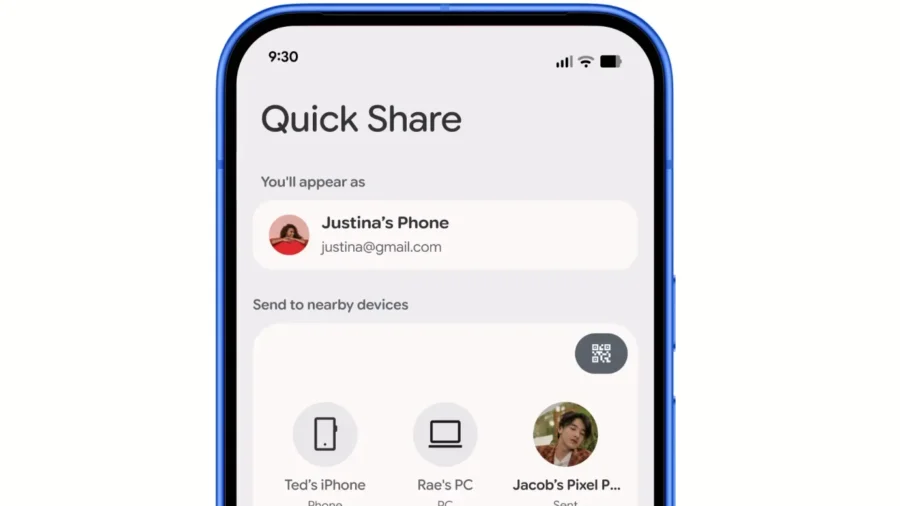
Google has rolled out Quick Share’s AirDrop-powered file sharing feature to more Android phones. Support, which started with the Pixel 10 family in November 2025, spread to Samsung, Google, Xiaomi, OnePlus, OPPO, Vivo and HONOR models within the scope of June Android Drop. The feature transfers photos, videos and documents between Android and iPhone directly through the sharing menus. Quick Share works on more Android phones with AirDrop.
Quick Share’s AirDrop support allows Android and iPhone users to send files without installing an additional application. On the Android side, sharing is done via Quick Share, and on the iPhone side, sharing is done via the AirDrop interface. According to Google’s statement, supported Android phones can send photos, videos and documents to iPhone users; iPhone users can also transfer files to compatible Android devices from the AirDrop menu.
To send files from Android to iPhone, the iPhone must be within Bluetooth range and AirDrop visibility must be set to “Everyone for 10 Minutes” via the Control Center. The Android user opens the file to be shared, selects Quick Share from the share menu, then selects the nearby iPhone to start the transfer. When the AirDrop notification from the iPhone is accepted, the file transfer begins. To send a file from iPhone to Android, the iPhone user selects the file they want to share and opens the AirDrop menu.
The Android device’s Quick Share receiving mode must be turned on. On Samsung phones, the “Share with Apple devices” option must also be turned on in the Quick Share settings. When these settings are made, the compatible Android phone appears in the AirDrop list and the file is received when the Android user accepts the transfer. According to Google’s official device list, AirDrop supported Quick Share is now on Samsung’s side for Galaxy S26, Galaxy S26, Galaxy S26 Ultra, Galaxy S25, Galaxy S25, Galaxy S25 Ultra, Galaxy S25 Edge, Galaxy S24, Galaxy S24, Galaxy S24 Ultra, Galaxy Z Flip7, Galaxy Z Fold7, Galaxy Z Flip6, Galaxy Z Fold6 can be used in Galaxy Z Fold6 Special Edition and Galaxy Z TriFold models.
On the Google side, Pixel 10, Pixel 10 Pro, Pixel 10 Pro XL, Pixel 10 Pro Fold, Pixel 10a, Pixel 9, Pixel 9 Pro, Pixel 9 Pro Xiaomi 17T Pro on the Xiaomi side, OnePlus 15 on the OnePlus side, Find X9, Find X9 Pro, Find X9 Ultra, Find X9s and Find N6 on the OPPO side, X300, X300 Pro and He also announced that he would come. These models are currently listed in the “coming soon” category. The version of Quick Share that works with AirDrop can share files with iPad and macOS devices as well as iPhone.
On supported Android devices, the transfer is made via the nearby device list after the AirDrop visibility of the opposite Apple device is turned on. Google states that this sharing can work without an internet connection. The QR code option can be used on Android devices that do not have AirDrop supported Quick Share. In this method, the Android device creates a QR code via Quick Share, the iPhone, iPad or macOS user scans this code with the camera application and downloads the file via the web browser.
For QR code transfer, both devices must be connected to the internet. According to Google’s support page, in this method, files are end-to-end encrypted, remain downloadable on Google servers for 24 hours, and do not use the user’s personal Google Drive storage. A maximum of 10 GB of files can be sent in 24 hours with QR code sharing. Up to 1,000 files can be shared in a single sharing session and sent to up to 20 iPhone, iPad or macOS recipients at the same time.
Video files can only be downloaded on iOS; Some files can be downloaded as ZIP. Google states that security and privacy checks are made for the connection between Quick Share and AirDrop. The company’s statement includes the information that in the independent security assessment conducted by NetSPI, the connections between Quick Share and AirDrop were found to be secure and no information leakage was detected. In AirDrop compatible direct transfer, files are not routed through the server, no extra data is shared, and shared content is not saved.
This expansion offers a new option at the system level in file sharing between Android and iPhone, in addition to messaging applications, cloud connections, and quality-losing alternatives that have been used for years. Quick Share and AirDrop integration largely eliminates operating system differences from the file transfer process on supported devices.




Comments
You can write your views about this story. Comments may be moderated according to site settings.