
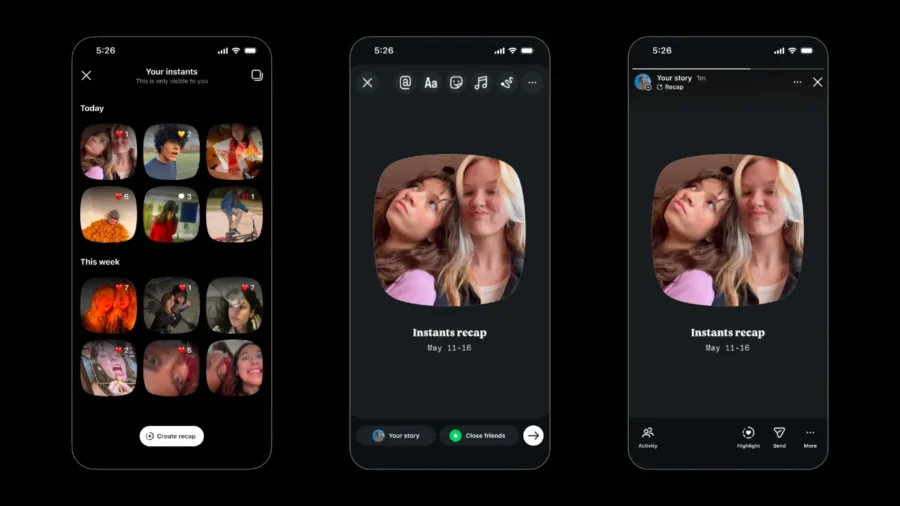
Instagram’s new Instant feature has become a hot topic for users with the instant photo sharing area that appears in the inbox. The feature added to the DM screen allows the photos taken at that moment to be shared with Close Friends or mutually followed people. However, sending photos quickly and creating a separate space in the inbox can be annoying for users who do not want to use the feature. So, how to turn off Instagram Quickie?
Steps to turn off Instagram Quickie. Users who want to turn off the Instagram Quickie feature need to go to the settings menu in the application. For this, first the profile screen on Instagram opens. Then, tap the three-line menu in the upper right corner and enter the Settings and privacy section. On this screen, you can move on to the Content preferences section. When the Hide Instants in Inbox option is enabled, the Quickie field does not appear in the Instagram inbox.
In Instagram’s Turkish interface, the name of this option may appear as Hide Instants, Hide Instants in the Inbox, or Hide Quickie contents in the Inbox. The menu name may vary depending on the user’s application version and the region where the account is located. However, the location of the setting is the same: Profile, Settings and privacy, Content preferences and the option to hide Instants/Instants content in the inbox.
When this setting is turned on, the Instants section is removed from the DM box. The user also does not see Instant content sent by others in his inbox. So the option doesn’t just hide its own Instant camera; It also turns off the Quickshot flow on the DM screen. Those who want to use the feature again can enter the same menu and disable this setting. It is also possible to temporarily hide Instagram Quickie without closing it completely.
When you press and hold the area where a stack of Snapshots appears in the inbox and swipe right, the stream of Snapshots is temporarily stopped. The feature can then be made visible again by pressing and holding the same area and swiping it to the left. This method can be used for users who want to hide the Quick section for a short time without going into the settings. The Quick feature works as an instant photo sharing system added to Instagram’s inbox.
By touching the Quick icon on the DM screen, users open the camera and can take a photo and share it with selected people. This post does not go through the editing screen like a classic Story or post. The photo disappears after it is opened, and unopened content cannot be viewed after 24 hours. For this reason, users who do not want to turn off the Quick feature should also check the target audience before sharing. Photos can be sent to the Close Friends list or to people you mutually follow.
The feature’s quick sharing logic increases the risk of accidental posting. The Undo option that appears on the screen can be used for an Instant photo sent by mistake. In addition, the user can delete the photo that has not yet been opened by entering the Şipşak archive. Photos cannot be uploaded from the gallery in Instagram Şipşak. Sharing is done only through the photo taken with the camera at that moment. A short description can be added to the photo, but there is no classic filter, editing or detailed preview flow.
According to Meta’s statement, screenshots and screen recordings cannot be taken in Instant photos. Sent photos disappear when opened by the recipient. Quick content sent by the user can be stored in a private archive for a while. This archive is only visible to the user and can later be used to create summaries for Stories. The Instagram Snap feature may not appear on all accounts at the same time. As with new Instagram features, deployment is gradual.
For this reason, while some users see the Quickbox field on the DM screen, the relevant option may not appear yet in some accounts. If the feature does not appear, it is necessary to update the application or wait for a while.






Comments
You can write your views about this story. Comments may be moderated according to site settings.