
Layr, the new clipboard manager developed for macOS, offers a different way of accessing the copy history, focusing on trackpad movement instead of classic keyboard shortcuts. The application opens the clipboard history at the point where the cursor is located with a four-finger touch gesture and allows users to quickly access previously copied content.
Layr moves clipboard history next to the cursor on macOS
On the Mac side, clipboard managers have long been an important part of productivity tools. Maccy, Paste, Raycast and similar solutions generally work via keyboard shortcuts. Layr, on the other hand, replaces this structure with a trackpad-oriented approach. The application stands out as a clipboard manager designed especially for users who use the MacBook trackpad extensively.
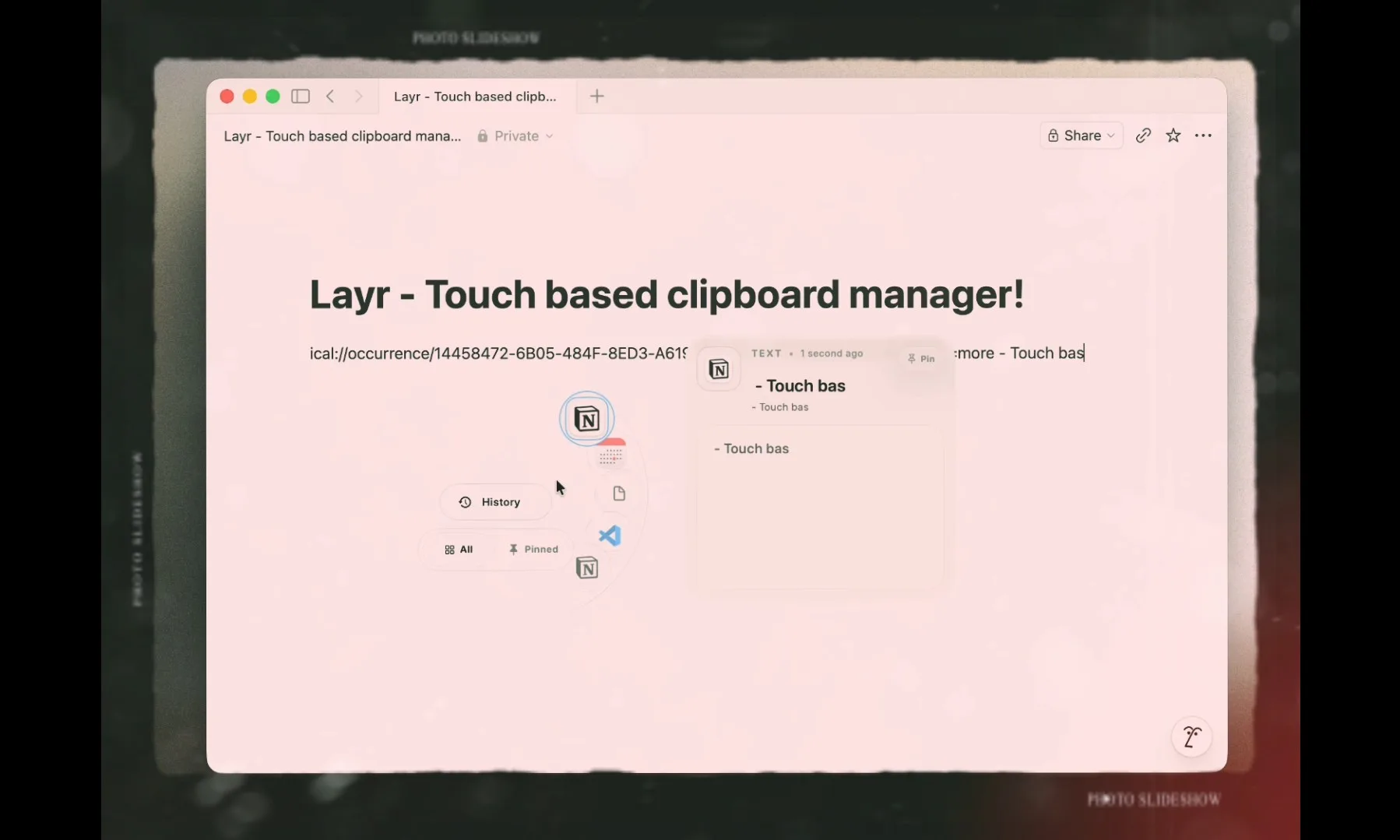
The main difference of Layr is that it shows the clipboard history not in a separate window or menu, but as a layer close to the point where the cursor is located. When the user touches the trackpad with four fingers, the content copied in the past appears on the screen. Thus, the user can access the previous copy items without disconnecting from the active application.
The application is not limited to just trackpad movement. In Layr, the clipboard history layer can be opened with a trackpad gesture or a keyboard shortcut. Settings and quick access options can be accessed via the menu bar panel. This structure does not completely exclude classic Mac habits, as well as trackpad-oriented usage.
Layr offers configurable record limit for clipboard history. The user can specify how many items to keep in the history. The application also includes history management by categories. In this way, copied content can be separated more regularly without being stuck in a single long list.
One of the notable features of the application is pinnable items. The user can pin frequently used texts, links or other clipboard contents to quickly access them later. This feature opens up a practical area of use, especially for people who constantly use the same texts, addresses, code fragments or short notes.
Layr also has application exclusion support. The user can ensure that content copied from certain applications is not saved by Layr. This option provides important control, especially for password managers, messaging applications or software containing sensitive data.
The application also supports auto-start at login. The user can set Layr to run automatically when macOS boots up. Thus, the clipboard manager can be used in the background without starting it manually each time.
Another detail of Layr is tactile feedback support during pasting. The application, which works via a trackpad, provides haptic feedback during the gluing action, allowing the process to be felt physically. This detail is among the features that complement the trackpad-centric design of the application.
Layr was created by the developer of Declutr. The developer states that the application is especially aimed at Mac users who work with trackpads. While most existing clipboard managers work keyboard-first, Layr brings access to clipboard history to a more visual and tactile flow.
The application is offered with a free trial option. After the trial period, a 5.99 euro one-time purchase model is used for Layr. The developer post also includes a short-term discount code.
Layr adds a new way to use the clipboard manager category on macOS. The app combines basic productivity features with trackpad gestures, such as storing copy history, categorizing, pinning, and excluding certain apps.






Comments
You can write your views about this story. Comments may be moderated according to site settings.