
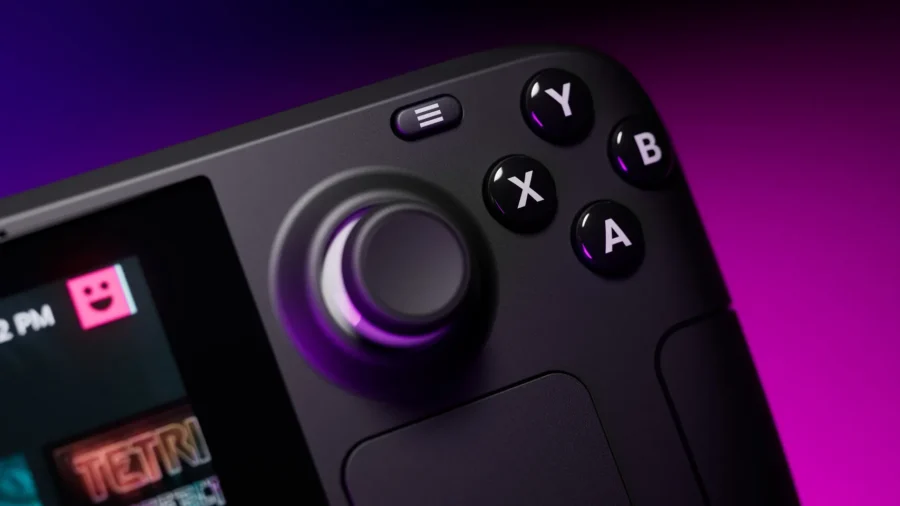
Valve has released the SteamOS 3.8.6 Beta update for the Steam Deck Beta and Preview channels. The new version, called “Second Clutch”, includes expanded hardware support for portable gaming computers outside of Steam Deck, the first VRR support over HDMI, controller fixes, display output improvements and the first preparations for Steam Machine hardware. HDMI VRR and new handheld console support came with SteamOS 3.8.6 Beta.
SteamOS 3.8.6 Beta is currently being tested in the Beta and Preview channels instead of the stable channel. Users can access the update by selecting the Beta or Preview channel from the Settings, System and System Update Channel section on Steam Deck. Valve states that the features in this version are still in the testing phase. One of the most notable innovations of the new version is the initial addition of HDMI VRR support for devices with built-in HDMI output.
VRR ensures that the refresh rate on supported displays is compatible with the frame rate in the game. Valve had also improved VRR frame timing in previous SteamOS 3.8 test builds. The update fixes an issue where the “Allow Tearing” setting was not working as expected on some configurations. An issue with video output freezing when using Remote Play has also been fixed. A fix has also been made for a possible session crash with certain “Maximum video height” settings in the Game Recording feature.
SteamOS 3.8.6 Beta introduces “New!” in Desktop Mode launcher entries in previous 3.8 versions. It also fixes a regression that caused the badge to appear in the wrong position. A fix for the issue that resulted in the screen remaining blank on some TCL televisions when using the Steam Deck Dock was also added to the package. Valve expanded controller support for the MSI Claw family with this version. MSI Claw A1M, MSI Claw 7 AI A2VM, MSI Claw 8 AI A2VM and MSI Claw A8 BZ2EM models have been added to the support list.
On the OneXPlayer side, controller support has arrived for the APEX and X1 series. The update also improves the gyro response on devices using AccelGyro3D. Valve’s notes include Lenovo Legion Go 1 and MSI Claw A1M models in this context. The system crash seen in international ASUS ROG Xbox Ally models has also been resolved with SteamOS 3.8.6 Beta. Previous beta changes of the SteamOS 3.8 series are also preserved with this package.
On the general side, we fixed a bug that caused Wi-Fi performance to decrease until the device was put to sleep or manually reconnected. Fixed excessive trackpad sensitivity seen on some early Steam Deck LCD models. The bug on the Steam Deck OLED side that caused speaker output to disappear after a reboot has also been resolved. Valve has added the first support for the upcoming Steam Machine hardware to the SteamOS 3.8 line.
Support for waking from sleep via the connected Steam Controller has also been included in the system. The Arch system base has been updated and the graphics driver has been revamped with performance and stability fixes. An issue where application-specific performance settings were sometimes not applied when launching the game has also been fixed. Valve has also added changes to this release line that make the download and installation process of future operating system updates faster on high-speed connections.
Screen casting support has been improved on the Game Mode side. In this context, there are improvements for using screencasts via software such as OBS and Discord. Fixed the bug that caused drop-down menus to not appear in some games. The problem of the badge appearing disabled even though FSR is active in the performance interface has also been resolved. There are also changes in game compatibility with SteamOS 3.8.
Improved support for games that try to open PDF files in external viewers. Added some missing graphical features needed by games like Crimson Desert. The issue that caused the window position to appear incorrectly in some games such as SpongeBob SquarePants: Titans of the Tide has been fixed. The bug that caused the session to crash when closing some games such as STAR WARS Jedi: Survivor and Starfield is also included in the list of fixes.
Improved support for USB racing wheels and some USB devices that boot in non-standard mode. According to Valve’s notes, such devices are sometimes detected as a USB storage device containing a driver installer and must be put into normal operating mode by the operating system. Steam Deck controller software updates can now show progress on the splash screen. Also fixed an issue where a firmware update on some Steam Deck revisions could render the left controller unusable for the duration of that session.
Fixes have also been made for the experimental nested desktop mode. The update also includes general stability and security fixes. On the Bluetooth side, Bluetooth Wake has been re-enabled for Steam Deck LCD. The fix for unnecessary wake-up problems seen in previous attempts has also been added to this area. On the audio side, the number of HDMI channels is detected and the surround configuration is displayed where possible.
A new setting has also been added that allows the use of Bluetooth headset microphones. Valve states that Bluetooth playback quality will decrease when this setting is active. Restoring the internal audio device set to “Off” in desktop mode after reboot, increased suspend timeout on HDMI devices that prevents the initial sound from cutting out after a few seconds of inactivity, error in switching input device when a wired headset is plugged in, and audio buffer issues after returning from sleep mode have also been fixed.
The option to force mono audio output has been added to the accessibility section. This option can be used at the system level for users who prefer single-channel audio instead of stereo output. On the Desktop Mode side, KDE Plasma 6.2.5 was moved to 6.4.3. SteamOS now uses Wayland by default in Desktop Mode. With this transition, some performance drops seen in Desktop Mode compared to Game Mode have been corrected. Rotated display support, better default scaling on televisions, external HDR display support, VRR display support, and per-display scaling factor support have also been added.
Keyboard layout and language settings now work in line with the settings in Game Mode. Improved window behavior in Proton-powered games. The bug that caused open applications in Desktop Mode to not be remembered when exiting with the “Return to Gaming Mode” shortcut was also fixed. On the system software side, BIOS v133 for Steam Deck LCD was included in the package. This BIOS release includes security updates, a “Memory Power Down” setup option, and initial support for hibernation.
There is BIOS v114 on the Steam Deck OLED side. In the OLED model, when the charging limit is exceeded or reached, the charging LED reacts with a different color instead of just 100 percent. The SteamOS 3.8 line also brings extensive changes to devices other than Steam Deck. Compatibility with new Intel and AMD platforms has been improved. Video memory management has been greatly improved on platforms using discrete GPUs.
Fixed the compatibility issue that caused a startup error caused by the SteamOS chainloader on some desktop systems with updated UEFI software. Short and long presses of the power button are now supported on a wider range of devices. Improved controller support for OneXPlayer F1 series, GPD Win 5, GPD Win Mini, Anbernic Win600, OrangePi NEO and Lenovo Legion Go. Added controller support for OneXPlayer X1 series and Lenovo Legion Go 2.
System and controller firmware update support has also arrived for Lenovo Legion Go 2. The first charge limitation support has been added for Lenovo Legion Go, Legion Go S and Legion Go 2. This feature is currently only accessible via Desktop Mode. Controller RGB LED color settings for Lenovo Legion Go 2 have also been included on the SteamOS side. Controller, TDP control and speaker sound support have been added for the ASUS ROG Xbox Ally series.
Controller input delay on portable devices has been reduced from 5-8 ms to 100-500 microseconds. On devices using Z2E and newer AMD APUs, night mode, color vibrancy, and color temperature sliders work within Steam. Seamless boot fixes have also been made in the same APU family. Automatic management of internally rotated screens has been enabled on some third-party handheld consoles. Improved motion control support on handheld consoles using the BMI260 IMU.
SD card reliability has been improved on devices such as ASUS ROG Xbox Ally, Lenovo Legion Go 1, Legion Go S, Legion Go 2 and MSI Claw. Faded color issue on Zotac and OneXPlayer OLED devices has been fixed. Fixed some GPU stutters seen in games such as Tales of Arise and Octopath Traveler II on devices using Phoenix APU. Fixed the power consumption issue caused by the fingerprint reader when the device is turned off on the ASUS ROG Ally model.
The bug where the trackpad function was lost after returning from sleep mode on Lenovo Legion Go was also fixed. A fix has also been made for unnecessary wake-up issues when using the Logitech Bolt receiver. On the developer side, Desktop Mode has switched to Wayland by default. X11 support can be selected from Steam developer settings or via steamosctl. Linux kernel updated to version 6.16. Steam now uses steamos-manager to query desktop sessions and trigger desktop session transitions.
Added support for setting a desktop password in developer settings. As part of virtual machine guest support for SteamOS, initial support was provided with virtio guest drivers. Support has also been added to allow third-party devices to trigger the SteamOS boot menu via the EFI variant. The custom-update command has been included in the atomupd-manager tool, making it easier to test specific builds. System reports now contain more audio debugging information.
Valve also added initial support for the LAVD CPU scheduler. This support can be enabled with the steamosctl set-cpu-scheduler lavd command.






Comments
You can write your views about this story. Comments may be moderated according to site settings.