

AI is usually described as something that happens in the cloud. You type a question, upload a file or ask an assistant for help, and powerful servers somewhere else do the heavy work.
Local AI is different.
Local AI, also called on-device AI, means the laptop runs some AI tasks directly on its own hardware instead of sending everything to remote servers. That can make AI faster, more private and more useful when the internet connection is weak.
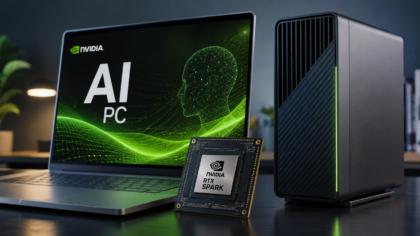
This idea is becoming more important because the PC market is changing. Microsoft is pushing Copilot+ PCs with dedicated AI hardware. Qualcomm describes on-device AI as AI that runs directly on a laptop using its processor and memory. Apple Intelligence can handle some requests on the device and uses Private Cloud Compute for more complex tasks. NVIDIA and Microsoft are also positioning RTX Spark as a new Windows PC platform for local AI agents.
In simple terms, laptop makers are trying to make AI feel less like a website and more like something built into the computer.
What local AI actually means
Local AI means the AI model runs on your device.
That device might be a laptop, phone, tablet or desktop computer. Instead of sending every request to a cloud data center, the device uses its own CPU, GPU, NPU or memory to process the task.
An NPU, or neural processing unit, is a chip designed to run AI tasks efficiently. It is not the same as a normal processor. A CPU handles general tasks, a GPU is strong at graphics and parallel workloads, and an NPU is built specifically for AI calculations with lower power use.
That is why modern AI laptops often mention NPUs. Microsoft’s Copilot+ PC category is built around local AI performance, and Microsoft has promoted examples of AI features that run entirely on-device through NPU hardware.
For users, the technical details matter less than the result. If the laptop can understand speech, summarize notes, improve video calls or run a small AI assistant without constantly using the cloud, that is local AI in action.
Why local AI can be faster
Cloud AI can be extremely powerful, but it has one unavoidable delay: your data has to travel.
When you ask a cloud model to do something, your request goes from your device to a server, gets processed, then returns with an answer. With a fast connection, this can feel quick. With a weak connection, it can feel slow.
Local AI reduces that dependency. If the task can run on the laptop itself, the response may arrive faster because it does not need to wait for a remote server.
This is especially useful for everyday features such as background blur, live captions, smart search, voice commands, photo cleanup or quick document actions.
Not every AI task can run locally. Very large models still need powerful cloud systems. But many smaller tasks can happen on the device, and that is where users may notice the difference most.
Privacy is one of the biggest reasons
Local AI can also help with privacy.
If an AI task runs on the laptop, sensitive information may not need to leave the device. That can matter for private documents, work files, personal photos, voice recordings or meeting notes.
Qualcomm describes on-device AI as useful for privacy because models can run locally on the machine. Apple also says Apple Intelligence decides whether a request can be processed on the device, while more complex requests can use Private Cloud Compute with privacy protections.
The important point is not that local AI makes every AI feature automatically private. It depends on the app, the operating system and how the company designs the feature.
But local AI gives device makers a better privacy option. Instead of sending every small task to the cloud, the laptop can handle some requests internally.
For users, that could make AI feel safer for personal and professional work.
Local AI can work offline
Another benefit is offline use.
Cloud AI depends on a connection. If the internet is slow, blocked or unavailable, the feature may not work.
Local AI can keep some tools running even without a strong connection. A laptop might still transcribe audio, clean up background noise, search local files or summarize notes if the required model is stored on the device.
This is useful for travelers, students, remote workers and anyone who works in places with unreliable internet.
It also makes AI features feel more like normal computer features. A calculator does not need the cloud. A file search tool should not always need the cloud either. Local AI moves some intelligent features closer to that model.
What local AI can do today
Local AI is already appearing in practical features.
It can improve video calls by blurring backgrounds, correcting eye contact or reducing background noise. It can help with live captions and translation. It can make photo editing tools faster. It can search local documents more intelligently. It can support small language models that answer basic questions or summarize files.
NVIDIA’s RTX Spark push goes further. NVIDIA says RTX Spark is designed for personal AI agents, creators and gaming on Windows PCs. The company is aiming at more powerful local AI workloads, including models and tools that would normally need stronger desktop hardware or cloud services.
This is why local AI is not one single feature. It is a direction for the whole computer.
Some users will notice it in video calls. Others will notice it in creative apps. Developers may notice it in local model testing. Gamers may notice it through AI-enhanced graphics tools.
What local AI cannot do yet
Local AI has limits.
A thin laptop cannot match a giant cloud data center. The largest AI models require huge amounts of memory, power and specialized hardware. That is why cloud AI will continue to matter.
Local AI also depends heavily on software support. A laptop may have an NPU, but if apps do not use it well, the user may not see much benefit.
Another issue is marketing. Some companies may label a device as an AI PC even if the real AI features are limited. Buyers should look for practical examples, not only branding.
The best question is simple: what can this laptop actually do locally that my current laptop cannot?
If the answer is unclear, the AI label may not be worth paying extra for.
Should you buy an AI laptop now?
For most people, there is no need to rush.
If your current laptop works well, local AI alone may not be enough reason to upgrade immediately. Many AI features are still developing, and some will improve through software updates over time.
However, local AI is worth considering if you are already buying a new laptop. It may help the device feel more useful over the next few years, especially as Windows, macOS and creative apps add more on-device AI tools.
Students, remote workers, creators, developers and frequent travelers may benefit first. They are more likely to use features like live captions, local search, AI editing, meeting summaries or offline assistance.
For casual users, battery life, screen quality, keyboard comfort, storage and software support may still matter more than AI branding.
What to check before buying
Before choosing an AI laptop, look beyond the label.
Check whether it has dedicated AI hardware such as an NPU, GPU or platform designed for local AI. Look at memory as well, because AI tasks can require more RAM than basic office work. Software support is also important. A good chip is less useful if the apps you use do not support it.
Battery life still matters. Local AI should not make a laptop die faster during normal work. Real-world reviews are more useful than launch claims.
Privacy settings are also worth checking. A device may support local AI, but some apps may still send data to the cloud. Users should know when processing happens locally and when cloud services are involved.
The bigger takeaway
Local AI is one of the most important shifts happening in laptops.
It does not mean the cloud is going away. Large AI models and advanced services will still depend on data centers. But more everyday AI tasks are moving onto the device itself.
That could make laptops faster, more private and more useful offline. It could also change what people expect from a new computer.
For now, local AI is still early. Some features are genuinely useful, while others feel like marketing. The best devices will be the ones that make AI feel practical without making users think too much about the technology behind it.
The future AI laptop may not be the one with the biggest slogan. It may be the one that quietly helps you work faster, protects more of your data and keeps useful tools running even when the cloud is not available.



Comments
You can write your views about this story. Comments may be moderated according to site settings.