
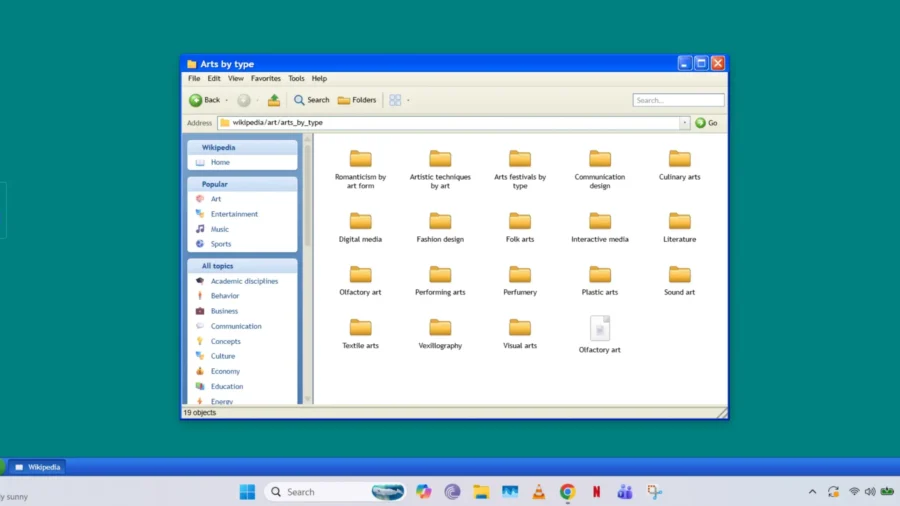
The new web project called Wikipedia File Explorer has brought Wikipedia and Wikimedia Commons content to a desktop interface reminiscent of the Windows XP era. Prepared by Sami Smith, the project makes encyclopedia articles and media content available through folders, windows and desktop icons with the logic of a classic file explorer. Wikipedia File Explorer makes the encyclopedia look like a file explorer. Wikipedia File Explorer offers a Windows XP-like desktop that works through the browser.
The interface includes Wikipedia, Media, Geofile Explorer and Readme.txt icons. When the user enters the Wikipedia folder, the contents are opened in category folders. Articles are displayed through document windows in line with the desktop experience. According to the project’s own description, the categories in Wikipedia can be navigated like a folder structure, and the content can be accessed through this structure, except for approximately 100 pages that do not have categories.
The project takes Wikipedia away from the web experience that proceeds with the usual search box and links, and places it in a structure that resembles the old operating system interface. In this structure, information is organized like folders and files on a computer rather than web pages. The user progresses through the category tree and reaches the relevant titles through subfolders and opens the selected article in the desktop window.
Wikipedia File Explorer is not limited to Wikipedia articles only. The Media section works as the category explorer for Wikimedia Commons. In this section, users can browse the images on Wikimedia Commons within the category structure. The project also allows you to set any image as the desktop background by right-clicking. There is also a separate section in the interface called Geofile Explorer. This episode is still in development.
According to the description of the project, Geofile Explorer is based on the idea of exploring the world like a folder on a computer. In this area, users can drag and drop an image to a folder or write a text note by right-clicking. The page also includes options to add images, write descriptions and submit for review. Wikipedia File Explorer also has a Start menu in its desktop interface. Familiar elements from the Windows The list includes works such as Neal.fun’s Wiki Files, Depths of Wikipedia, Orteil’s Nested project, web-based Windows XP interfaces and XP.css.
This detail shows that Wikipedia File Explorer is positioned in line with both knowledge discovery and web experiences based on old desktop interfaces. Wikipedia File Explorer soon came to the fore on Hacker News. In the post on the platform, the project stood out with the title of exploring Wikipedia like a Windows XP desktop. In the comments, attention was drawn to the fact that the category structure shows Wikipedia’s information network with a folder logic.
Some users also stated that the search function in the interface should become more useful. The project does not own the contents of Wikipedia and Wikimedia Commons. The readme file clearly states that the files and folders in the Wikipedia and Media folders belong to Wikimedia and their respective owners. For those who want to improve their folder structure, there is also guidance on opening an account on Wikipedia and Wikimedia and making contributions.






Comments
You can write your views about this story. Comments may be moderated according to site settings.