
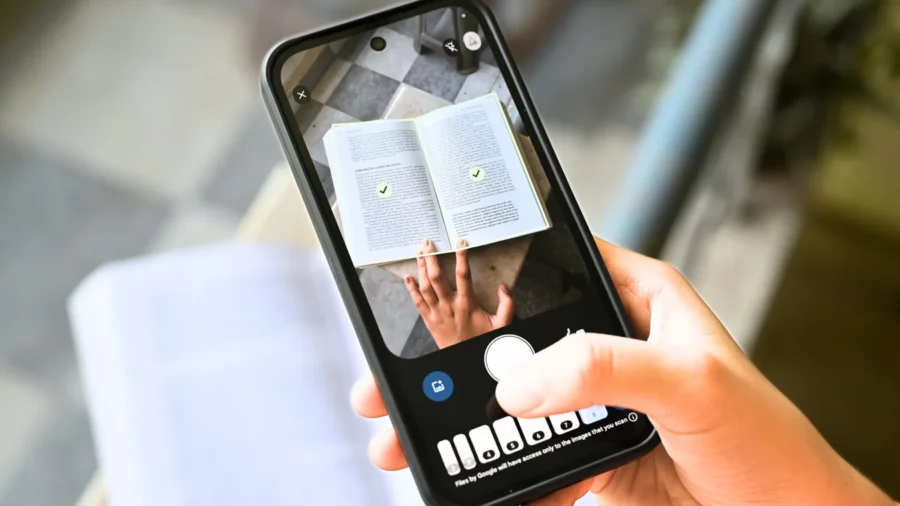
Google has revamped the Google Drive document browser on Android. With the new version, users can scan multiple documents one after another, and when the system detects the same page again, it captures it and replaces blurry scans with clearer frames. Artificial intelligence-supported document scanning feature has arrived in Google Drive. The most notable innovation in Google Drive’s renewed document scanner is Smart Batch Scanning.
This feature reduces the need for the user to press the shutter button separately for each page. When the phone camera is hovered over the documents, the system detects the pages, scans them and, when appropriate, separates them into separate documents. The new scanning system works with a flow that resembles video recording rather than the classic photo taking experience. When the user holds the phone over the documents, the pages appear as a preview at the bottom.
Thus, multi-page documents, receipts, contracts, forms, notes and invoices can be transferred to digital media without taking individual photographs. Google also added the Duplicate Detection feature to this experience. The system notices this when the user revisits a previously scanned page. This prevents the same page from being added to the document a second time. Re-scanning errors, which are common in multi-page documents, are reduced with this feature.
The new feature called Auto-Best Frame focuses on the quality side. The system can automatically replace blurry scans with a clearer frame. Phone movement, lack of light or clarity problems that occur during handheld shooting are less of a problem with this feature. The user does not have to re-scan the document for each corrupted frame. Material 3 Expressive design language is used in the renewed interface. The camera viewfinder has a more modern look, and page previews are shown at the bottom of the screen while browsing.
When you want to stop automatic scanning, the pause button on the right can be used. The system file selector is also included in the interface to scan from an image previously taken on the device. With its current structure, the Google Drive document scanner can save documents such as receipts, letters and invoices to Google Drive as searchable PDF. The scanning feature can be used on Android and iOS devices via the mobile application.
There is no document scanning support in the web version. The new smart scanning experience is processed on the device. According to the structure provided by Google, no internet connection is required for the smart features used during browsing. Performing transactions on the device creates an important distinction in terms of both performance and privacy. Since the features work through Google Play services, the new browser is also included in applications such as Files by Google in addition to Google Drive.
There is a hardware requirement for the update. The new document scanning experience works on Android phones with at least 8 GB of RAM. Therefore, it is not expected to appear on all Android devices at the same time. Availability may vary depending on device model, region and distribution process. Google Drive’s document browser has previously been renewed with editing tools such as cropping, rotation, color filter, shadow deletion, page preview, page deletion, redraw and thumbnail carousel.
The new update adds faster scanning, repeat detection and clarity improvement features on top of this editing layer. The update is distributed for Android users. The feature can be used through the new browsing interface in Google Drive. Users with eligible devices can check out the new interface and bulk scanning support by opening the scanning tool in the Drive app.






Comments
You can write your views about this story. Comments may be moderated according to site settings.