
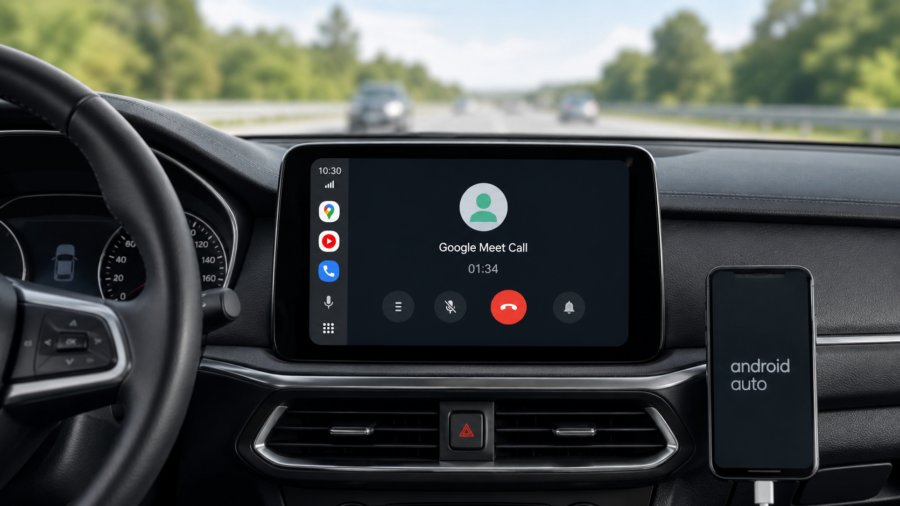
Google Meet is becoming more useful in the car, but it is not turning Android Auto into a full video meeting room.
Google’s support page now explains that Meet can be used on Android Auto to join meetings and make calls from a personal account while driving. The experience is designed to be simplified and audio-focused, with the goal of reducing distractions behind the wheel. Google also states that work profile accounts are not supported in Meet on Android Auto for now.
That detail is important. Google Meet is widely used for work, school and team calls, but Android Auto support currently appears more useful for personal accounts than for many workplace users. For ordinary drivers, the feature could still make car calls easier. For business users, the account limitation may be the part that matters most.
Why this update matters
Android Auto already handles maps, music, messages and voice controls. Bringing Meet into that environment makes sense because many drivers already take calls through their car’s speakers.
The difference is that Meet calls have often felt separate from the normal car interface. A meeting may start on a phone, audio may route through Bluetooth, and controls may not always feel as clean as a regular phone call. A dedicated Android Auto experience can make joining, muting or leaving a call simpler.
Google describes Android Auto as a platform built to help drivers stay focused, connected and entertained with a simplified interface, large buttons and voice actions. Meet fits into that same idea, as long as the feature remains focused on audio and avoids pulling attention away from the road.
For users, the practical benefit is not that the car becomes a productivity hub. It is that a call already happening in daily life can be handled with fewer awkward steps.
What Google Meet on Android Auto can do
Google’s support page says Meet on Android Auto can be used to join meetings and make calls from a personal account. It also says the experience is audio-focused and designed to reduce distractions.
That means users should not expect a normal video meeting experience while driving. This is not about watching slides, reading chat messages or looking at other people’s cameras on the dashboard. It is about hearing the call, speaking through the car microphone and using a simpler in-car interface.
That limitation is a good thing from a safety perspective. Car screens should not compete with the road. A meeting app in a vehicle needs to behave more like a phone call than a laptop meeting.
The most useful scenario is easy to imagine. A person gets into the car near the start of a scheduled call, connects Android Auto, and joins the meeting through the dashboard instead of handling everything from the phone. If the controls are clear, that can be less distracting than switching between phone screens.
The big catch: work accounts
The main limitation is account support.
Google says work profile accounts are not supported in Meet on Android Auto. Active calls may still appear on the car display, but upcoming meetings and call history will not show for those accounts.
That creates a strange gap. Many Google Meet sessions happen through work or school accounts. If someone mainly uses Meet for professional meetings, the Android Auto feature may not behave the way they expect.
This does not make the feature useless. It still helps people who use personal Google accounts for family calls, casual group meetings, personal appointments or non-work conversations. But it does mean the rollout is not yet a complete answer for commuters who live inside Workspace calendars.
The best way to describe the feature today is simple: useful, but not fully mature.
Why audio-only is the right approach
It may seem disappointing that Meet on Android Auto is not a full meeting experience, but audio-first design is the safer and more realistic approach.
Driving already requires constant attention. A video meeting adds faces, movement, notifications and social pressure. Even if the driver does not intend to look often, the screen can become a distraction.
Android Auto’s strength is that it reduces phone interactions into simpler car-friendly actions. Maps, voice messages and music controls work because they are designed around quick glances and voice input. A meeting app has to follow the same logic.
That is why Google’s description of Meet on Android Auto as a simplified, audio-focused experience is the most important part of the feature. The safer version of car meetings is not “Zoom-style video on the dashboard.” It is closer to a normal hands-free call with better meeting controls.
How this fits into Google’s bigger car plans
Google has been expanding Android Auto and cars with Google built-in beyond basic navigation and music. In May, Google announced updates for Android in cars, including a refreshed interface, improved in-car experiences and video streaming features for parked vehicles.
That wider direction shows how car software is changing. The dashboard is becoming more like a controlled extension of the phone, but with stricter safety boundaries.
Meet is part of that shift. It brings another familiar app into the car environment, but the feature has to be carefully limited. People may want access to more apps while driving, but not every phone experience belongs on a car screen.
The future of Android Auto will likely depend on that balance: more useful apps, fewer dangerous distractions.
Who should use it?
Google Meet on Android Auto is most useful for people who already use Meet for simple voice conversations and want easier in-car controls.
It may help drivers who:
Need to join a personal meeting while commuting
Want call controls on the car screen instead of the phone
Prefer car speakers and the built-in microphone
Use Android Auto regularly and already trust its interface
It is less useful for people who rely mostly on work profile accounts, need visual meeting content, or expect full calendar access from a company account.
Drivers should also treat it like any other in-car communication feature. If a meeting requires careful attention, note-taking or visual material, it is better handled before driving, after parking or from a proper workstation.
What Android users should check first
Before expecting the feature to work, users should check whether their phone, vehicle and Android Auto setup are compatible. Android Auto availability can depend on the car, region, phone version and app rollout.
Google’s Android Auto page notes that the platform works by connecting a phone to a compatible car, either wirelessly or through USB depending on the vehicle. Like many Google features, Meet support may also roll out gradually.
Users should also confirm which Google account they are using. If the meeting is tied to a personal account, the experience is more likely to match Google’s support description. If the meeting is tied to a work profile, the feature may be limited.
A useful feature, not a full solution yet
Google Meet on Android Auto is a practical addition because it solves a real problem: people already take calls in cars, and better in-car controls can make those calls easier to manage.
But the feature should not be oversold. It is audio-focused, not a full video meeting experience. It supports personal accounts, while work profile support remains a major limitation. And like all car software, it should be used carefully so that the road stays first.
For Android users, the takeaway is clear. Meet on Android Auto could make simple car calls smoother, especially for personal meetings. But if Google wants it to become a serious commuting tool for professionals, work account support will need to improve.




Comments
You can write your views about this story. Comments may be moderated according to site settings.