

Spotify introduced its new clip feature for users who listen to podcasts. In the mobile application, certain moments, especially in podcast episodes, can be cut, edited, saved in the library and shared on different platforms.
The ability to cut, save and share clips from podcast episodes has arrived
Spotify has gradually opened the new feature called Podcast Clips for mobile users. Instead of sharing an entire podcast episode, the new system allows you to select a specific moment within the episode. Users can now turn the part that interests them into a separate clip during the podcast they listen to.
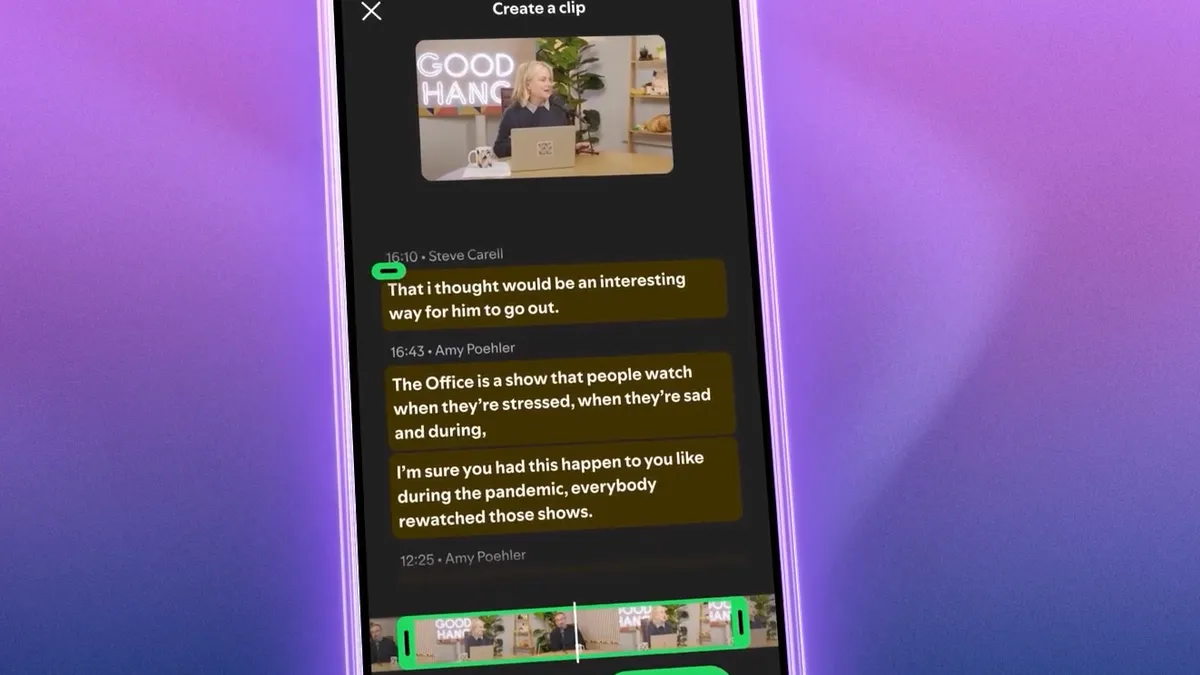
The feature works via the scissors icon added to Spotify’s Now Playing screen. When the user touches this icon, he can take a section from the episode he is listening to. Then the start and end points of the clip can be edited. It is also possible to preview and save the clip before sharing.
Spotify also updated the sharing menu with this feature. Users can now share the full episode, chapter within the episode, a specific timestamp, or directly the clip they created, via the same menu. Clips can be sent to friends via Spotify Messages or shared on other supported platforms.
The created clips are automatically saved to the user’s Spotify library. Users can return to these clips later or add them to podcast playlists. Thus, short moments that you want to listen to again in long podcast episodes can be stored separately.
The Chapters feature, which Spotify introduced earlier in the year, continues as a part of this structure. According to data shared by the company, Chapters are recorded and added to playlists more than 2 million times a month. Podcast Clips expands this structure with shorter, shareable and personal sections.
The new feature is available on mobile for both Free and Premium users. Distribution has begun globally, but the feature may not appear on all podcasts at the same time. Spotify states that the clip icon will become active in more podcast programs over time.






Comments
You can write your views about this story. Comments may be moderated according to site settings.